
RESOURCES FOR PRINT + DESIGN
HOW CAN WE HELP YOU?
Here is a quick guide to questions we often get asked. If you don’t find the answer you’re looking for feel free to give our office a call. We love helping our clients achieve the very best possible outcome on every project we take on. You can count on us!
Also check out our blog for a more detailed post about setting up your files for print here.
FILE TYPE WE PREFER
Print-Ready Single Page PDF with Bleed. No printer spreads here, please! We will impose the job to best fit our press.
PDF EXPORT SETTINGS
When exporting you PDF please use the “High Quality Print” setting and include “Document Bleed Settings” in the options if your document contains elements that bleed off the edges.
If you’re not creating your PDFs from a design layout program, please use the “Best for Printing” option or something similar.
LARGER FILE SIZES
If your document is too large to email we’ll need you to contact us and/or send us a link to your own shared drive. If you don’t have that ability we can set you up with a username and password for our FTP site.
PANTONE CONVERSION
If you’re using a Pantone color our press will automatically convert it to CMYK with formulas predetermined by HP to closely match the PMS tone. We can color match to previous print jobs, we’ll just need a sample to get the color you’re looking for.
RGB CONVERSION
Any files that are submitted in RGB will automatically be converted to CMYK. It is preferred that all print-ready files be in CMYK color mode for best results. Files may need to be adjusted for color brightness and contrast if they are getting converted on-press.
RICH BLACK
If you’d like black to print rich, please use the color build C20 M20 Y20 K100. Registration black (100-100-100-100) will not produce the best results.
WHY DO I NEED BLEED?
If your document has a full background color or image that runs off the edge of the page, bleed is for you! This will ensure that there are no gaps in the gutter or white edges that could ruin the aesthetic of your design.
HOW MUCH BLEED DO I NEED?
If you’re printing a 1-page item (like a business card or letterhead) we need at least 1/16″ bleed (.0625″) on each side.
If you’re printing a multi-page item that requires binding, die-cutting, or foiling we may ask for more bleed. 1/8th” (.125″) or more may be needed based on the project specs (paper, page count, etc). Feel free to ask what would be best for your project!
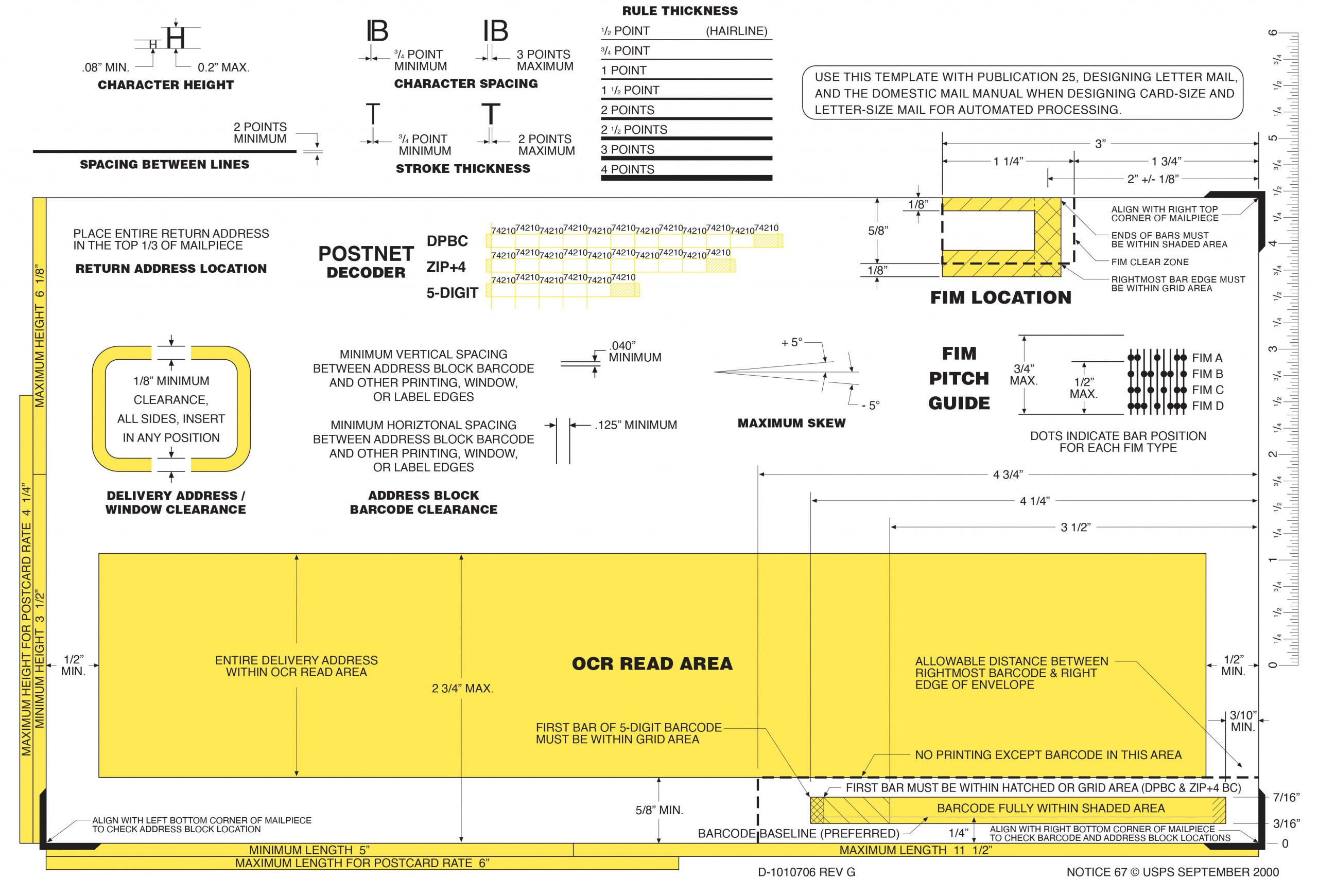
What are the USPS clear‑zone dimensions and layout rules for postcard mailing panels?
When preparing postcards for USPS mailing, it helps to think of the address side as divided into a clear mailing panel area on the right half of the back. USPS has specific clear‑space and barcode requirements to ensure machine readability and avoid delays or extra postage charges. The key areas to leave free of design elements (text, images, heavy backgrounds, or decorative elements) are:
-
Postage/Indicia Area: Leave room in the upper right corner for the postage stamp or indicia.
-
Address Block Area: Reserve space just left of the postage area for the recipient’s address, generally centered vertically on the right half of the card. Use a clear, legible font and ensure all address lines are parallel to the bottom edge.
-
Barcode Clear Zone: USPS requires a clear area in the lower right portion of the address side so mail sorting machines can print or read barcodes. For standard postcards this zone is defined as the area from the right edge to about 4¾″ from the right edge, and from the bottom edge up at least 5⁄8″ — keep this space free of printed graphics or text so the barcode region is unobstructed.
-
Return Address: If you include a return address, it’s typically placed above the address block or above the mail panel on the left side of the address half.
Everything to the left of the mail panel can be used for messaging, branding, photos, or other creative content; just avoid placing critical elements within the reserved USPS clear and barcode zones.
Contact us with any questions you may have, we’re happy to help!